My Azure Journey #2: Blob Trigger Silence, a Missing Setting, and Making Managed Identity Work
Hello again! In Part 1 of this series, I wrote about VM sizes and how I finally got Ubuntu talking RDP. This time I moved on to something closer to the real project: Azure Functions.
The plan was simple. Create a Function App, add a blob trigger on a storage container, upload a CSV file, and watch the log light up. I uploaded the file and watched the log. Nothing happened. I watched it for a while longer—still nothing.
This is the second part of my record of the mess, so that future-me (and perhaps you) won't have to go through it again.
Issue #1 — the trigger that never triggered
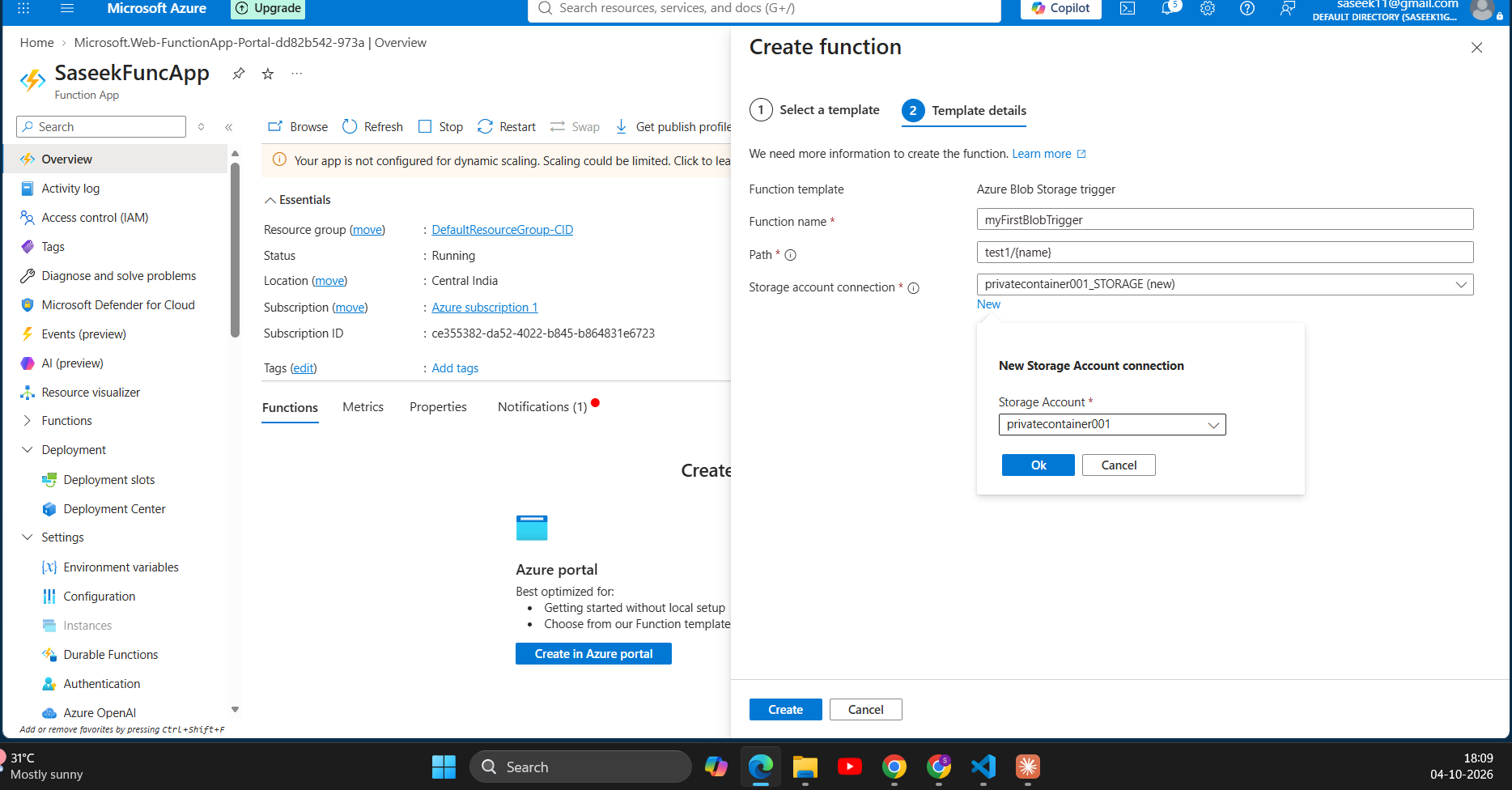
I had a Function App on the Consumption plan (Node), with a blob trigger created from the portal. The path was test1/{name}, and I uploaded People1.csv into that container.
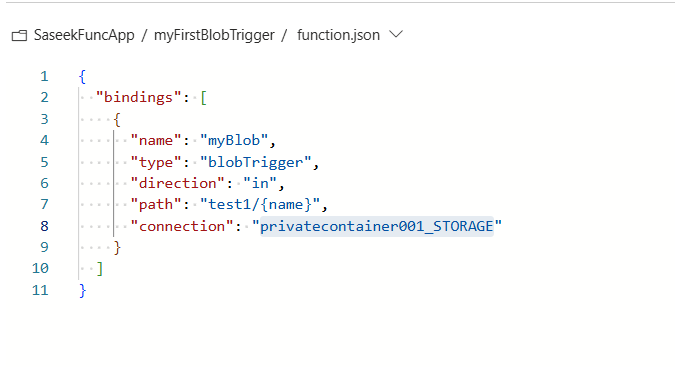
The log stream said "Connected!" and then went completely quiet. No errors, no warnings. Cool, very helpful, thanks Microsoft.
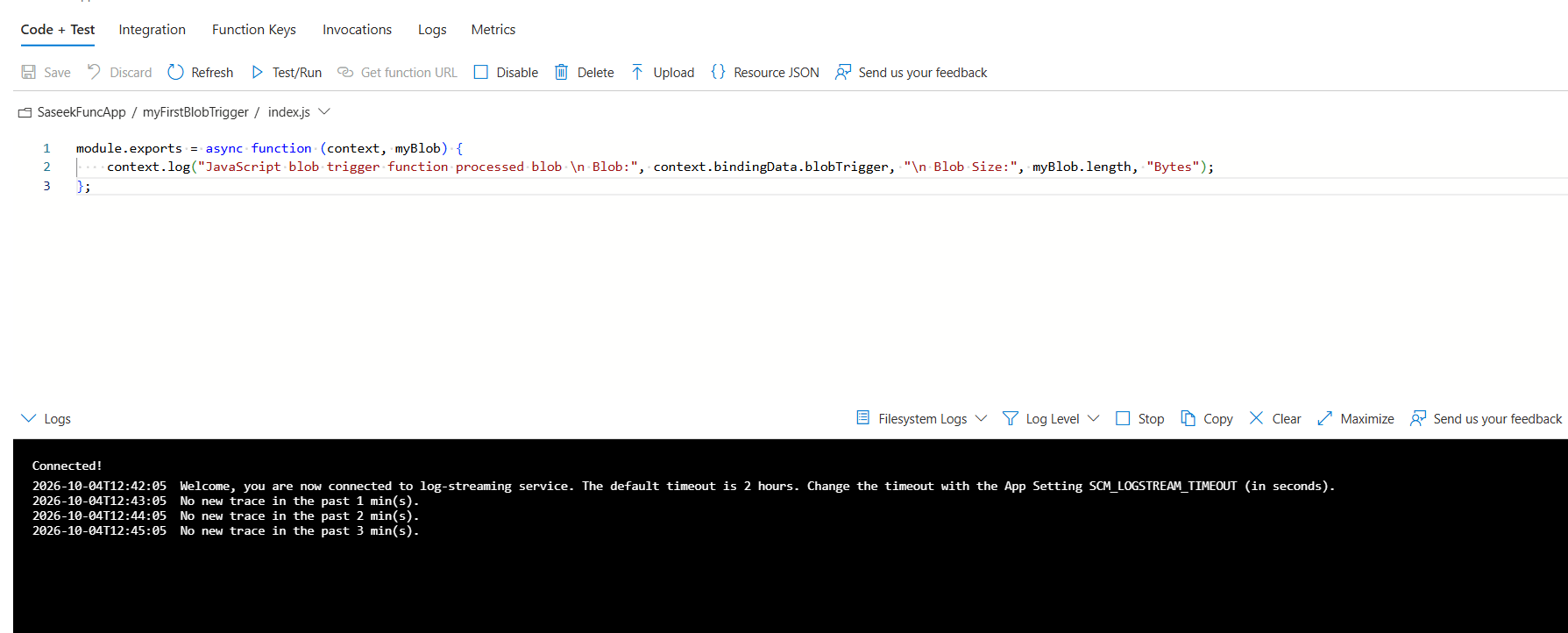
My first guess was a delay. On the Consumption plan, an idle function app can take up to about 10 minutes to notice new blobs, so I waited. That wasn't it. I waited for more than 20 minutes
So I looked at the app settings. When I created the trigger, the portal had generated a privatecontainer001_STORAGE setting for me, so I assumed storage was taken care of. It wasn't. There were only six or seven settings, and AzureWebJobsStorage wasn't one of them.
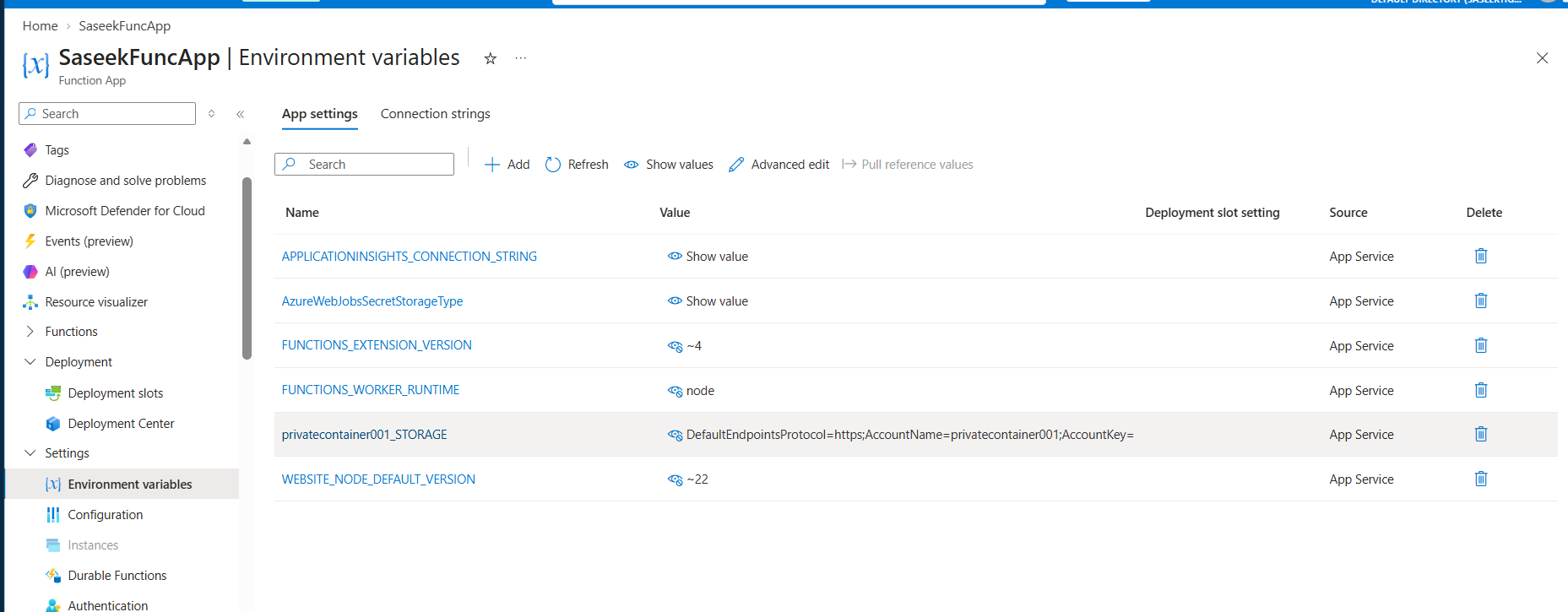
These two settings are easy to mix up. privatecontainer001_STORAGE only tells the trigger which container to watch. AzureWebJobsStorage is the Functions host's own storage, where it keeps blob receipts (the markers for "already processed"), keys and locks. The docs say the app can't start without it, and the blob trigger depends on it too.
The fix was to add AzureWebJobsStorage with the connection string from the storage account's Access keys page, save, and let the app restart.

traces | where timestamp > ago(30m) | order by timestamp descA key fixed the trigger. Now I wanted the key gone
Issue #2 — going keyless with managed identity
I didn't like having a connection string sitting in app settings, so I switched to the function app's managed identity. It takes three steps, and the third one has a trap.
Step 1 — Turn on the identity
Function App → Identity → System assigned → On → Save.
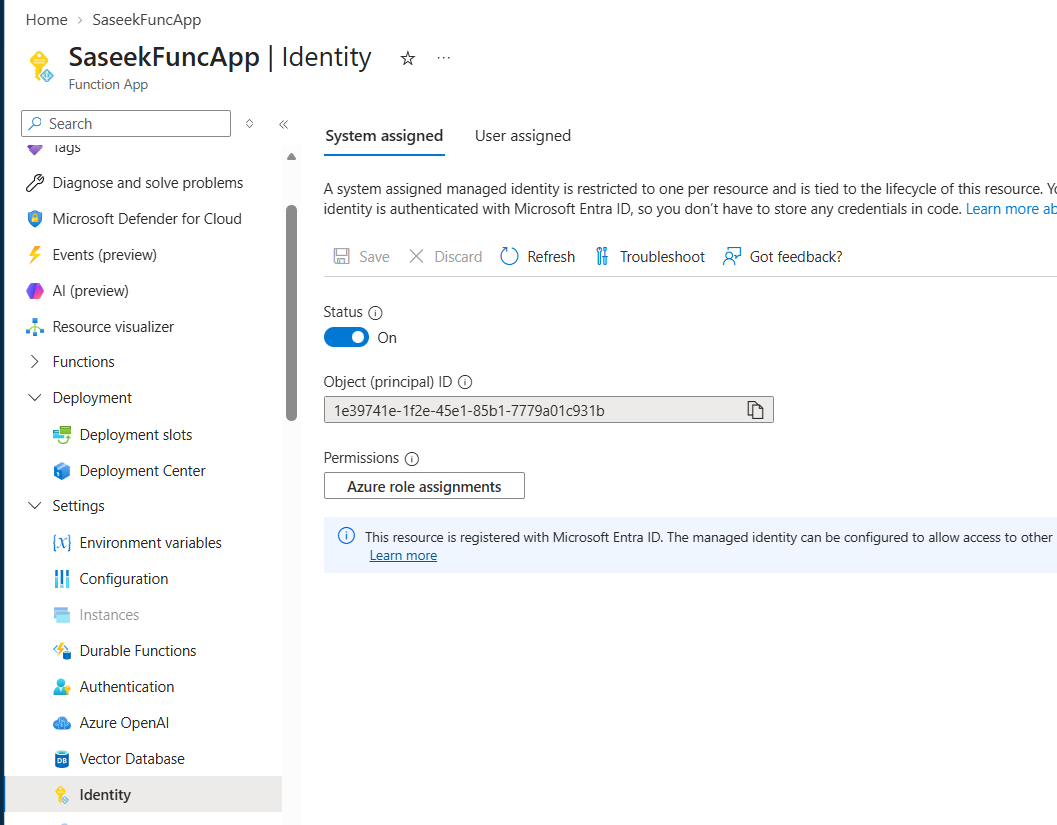
Step 2 — Give it roles on the storage account
Storage account → Access control (IAM) → Add role assignment.
Assign Storage Blob Data Owner and Storage Queue Data Contributor to the function app's identity. Do it at the storage account level, not just on the container.
The docs also mention Storage Table Data Contributor for host diagnostics. I only tested with the two roles above.
Step 3 — Change the app settings
This is where I got stuck. The shortcut AzureWebJobsStorage__accountName only works for AzureWebJobsStorage. It is not for custom connection names like my privatecontainer001_STORAGE. Here is what I tested:
function.jsonconnection =privatecontainer001_STORAGE, with onlyAzureWebJobsStorage__accountName→ failed. The custom connection name wasn't defined anywhere.Same connection name, plus
privatecontainer001_STORAGE__blobServiceUriandprivatecontainer001_STORAGE__queueServiceUri→ worked.__credential=managedidentityis optional for a system-assigned identity.function.jsonconnection =AzureWebJobsStorage→ worked with justAzureWebJobsStorage__accountName.The custom connection name is arbitrary. It only exists because
function.jsonpoints at it. If both host and trigger use the same account, pointingfunction.jsonatAzureWebJobsStorageis the simplest option.Remove the old key-based
privatecontainer001_STORAGEsetting (theDefaultEndpointsProtocol=...one) so nothing quietly keeps using the key.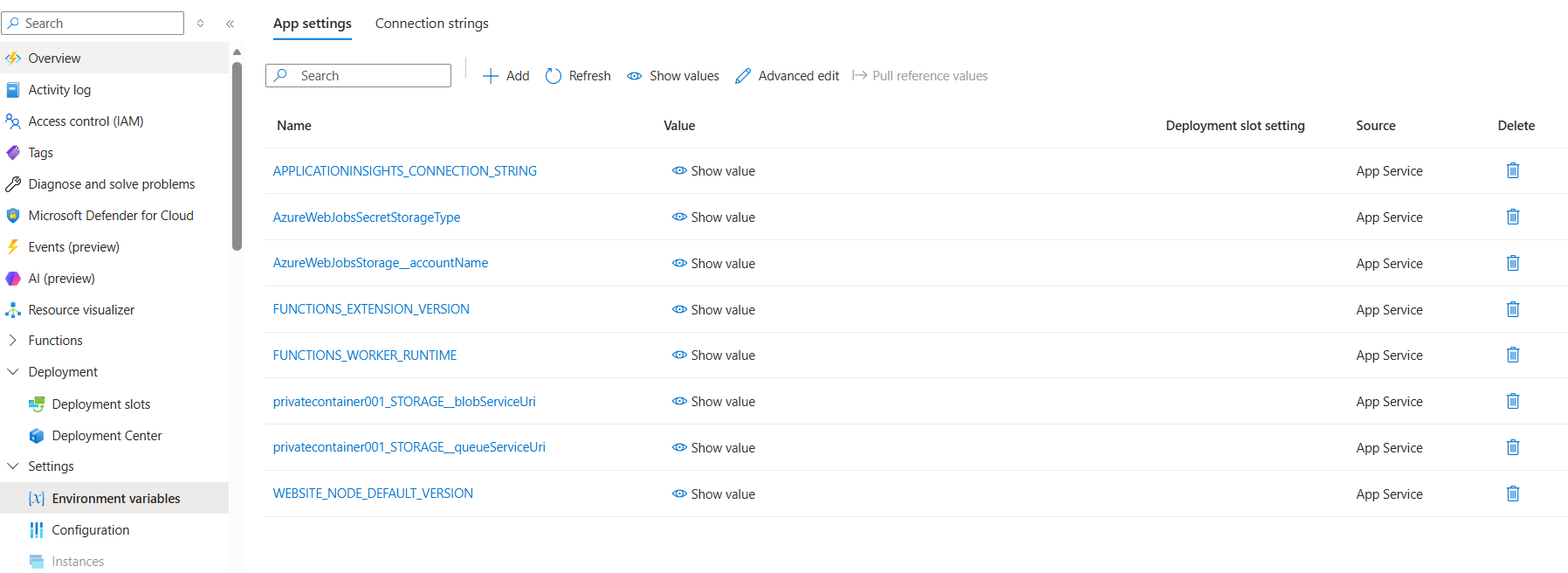
Issue #3 — the 403 that appeared out of nowhere
Right after switching to identity, the function overview page showed this:
This request is not authorized to perform this operation using this permission. ErrorCode: AuthorizationPermissionMismatch
It was better news than it looked. A 403 means the request reached the storage service and the identity was recognised. It just wasn't allowed to do that operation, so the network and the setting names were fine.
I checked three things: the roles were on the storage account scope, they were data-plane roles (Owner and Contributor on their own don't give blob data access), and no condition was limiting the assignment. The last piece is timing. Role assignments can take up to 10 minutes to propagate, so restart the app and wait before you decide anything is broken.
Issue #4 — the role that wasn't the fix
While chasing the 403, one walkthrough said to add Storage Account Contributor as well. I added it, the trigger started working, and so I almost thought it was the fix.
Just out of curiosity, I removed the roles to play around, waited 10 minutes, and uploaded a fresh file. It still worked. So that role wasn't needed, and the real culprit was most likely propagation time.
"If you change five things and it works, you haven't fixed a bug, you've won a lottery"
--saseek azmi 🤪
The final setup
Host and trigger on the same account, simplest option:
AzureWebJobsStorage__accountName = privatecontainer001
"connection": "AzureWebJobsStorage" in function.json
Roles on the identity (storage account scope): Storage Blob Data Owner and Storage Queue Data Contributor.
If you want a separate trigger connection, add <name>__blobServiceUri and <name>__queueServiceUri for your custom name.
Frankly speaking, the setup was only a few settings and two roles. What made it painful was that nothing threw an error: a silent log, a setting I assumed was there, and a role change that just needed time. Once I knew the host has its own storage connection, the rest fell into place.
Did AzureWebJobsStorage or role propagation get you too? Let me know in the comments below.
References
Connections and identity:
https://learn.microsoft.com/en-us/azure/azure-functions/manage-connections https://techcommunity.microsoft.com/blog/appsonazureblog/use-managed-identity-instead-of-azurewebjobsstorage-to-connect-a-function-app-to/3657606Blob trigger: https://learn.microsoft.com/en-us/azure/azure-functions/functions-bindings-storage-blob-trigger
App settings reference: https://learn.microsoft.com/en-us/azure/azure-functions/functions-app-settings
About the author
- Senior Software Engineer @Relevantz | I write about modern JavaScript & building web apps
Comments
Join the discussionWhich Functions runtime and storage-extension/extension-bundle versions did you use for the role-removal test?
There is a distinction to capture here: Microsoft's current permissions table lists Storage Blob Data Owner + Storage Queue Data Contributor for the blob trigger, and additional Storage Queue Data Contributor + Storage Account Contributor permissions in host-required storage. This is separate from the base AzureWebJobsStorage requirement: https://learn.microsoft.com/en-us/azure/azure-functions/manage-connections?pivots=functions-auth-identity#grant-permissions-to-an-identity
Since your host and trigger share an account, including the exact versions and a fresh host start after removing the role would help readers reproduce your result. The specific denied operation in storage logs would also help explain any difference from the documented permissions.
Functions runtime ~4 (FUNCTIONS_EXTENSION_VERSION = ~4), Node worker, Consumption plan, and the extension bundle range [4.*, 5.0.0) in host.json (the platform-generated default). I didn't record the exact bundle or Storage extension version that actually resolved.
My Azure Journey
Learning Azure by breaking things and fixing them. This series documents my hands-on experiments, real-world setup mistakes, and key takeaways as a beginner—so you can learn from my missteps and deploy with confidence